# rehype-prism-plus
[rehype](https://github.com/wooorm/rehype) plugin to highlight code blocks in HTML with [Prism] (via [refractor]) with additional line highlighting and line numbers functionalities.
Inspired by and uses a compatible API as [@mapbox/rehype-prism](https://github.com/mapbox/rehype-prism) with additional support for line-highlighting and line numbers.
Tested to work with [xdm], MDX compiler.
An [appropriate stylesheet](#styling) should be loaded to style the language tokens, format line numbers and highlight lines.
**Best suited for usage in Node.**
If you would like to perform syntax highlighting _in the browser_, you should look into [less heavy ways to use refractor](https://github.com/wooorm/refractor#browser).
## Installation
```
npm install rehype-prism-plus
```
## Usage
Use this package [as a rehype plugin](https://github.com/rehypejs/rehype/blob/master/doc/plugins.md#using-plugins).
Some examples of how you might do that:
```js
import rehype from 'rehype'
import rehypePrism from 'rehype-prism-plus'
rehype().use(rehypePrism).process(/* some html */)
```
Here's an example of syntax highlighting in Markdown, with [xdm]
```js
import { compile } from 'xdm'
import rehypePrism from 'rehype-prism-plus'
async function main(code) {
console.log(String(await compile(code, { rehypePlugins: [rehypePrism] })))
}
main(`~~~js
console.log(1)
~~~`)
```
## Sample markdown to HTML output
Input:
````md
```js {1,3-4} showLineNumbers
    function
    fancyAlert(arg)
    {


    if
    (arg)
    {


    $.facebox({ div:
    '#foo'
    })


    }


    }
```
````
HTML Output:
```html
function
fancyAlert(arg)
{
if
(arg)
{
$.facebox({ div:
'#foo'
})
}
}
```
## Styling
To style the language tokens, you can just copy them from any prismjs compatible ones. Here's a list of [themes](https://github.com/PrismJS/prism-themes).
In addition, the following styles should be added for line highlighting and line numbers to work correctly:
```css
pre {
overflow-x: auto;
}
/**
* Inspired by gatsby remark prism - https://www.gatsbyjs.com/plugins/gatsby-remark-prismjs/
* 1. Make the element just wide enough to fit its content.
* 2. Always fill the visible space in .code-highlight.
*/
.code-highlight {
float: left; /* 1 */
min-width: 100%; /* 2 */
}
.code-line {
display: block;
padding-left: 16px;
padding-right: 16px;
margin-left: -16px;
margin-right: -16px;
border-left-width: 4px;
border-left-color: rgb(31, 41, 55); /* Set code block color */
}
.highlight-line {
margin-left: -16px;
margin-right: -16px;
background-color: rgba(55, 65, 81, 0.5); /* Set highlight bg color */
border-left-width: 4px;
border-left-color: rgb(59, 130, 246); /* Set highlight accent border color */
}
.line-number::before {
padding-right: 16px;
margin-left: -8px;
color: rgb(156, 163, 175); /* Line number color */
content: attr(line);
}
```
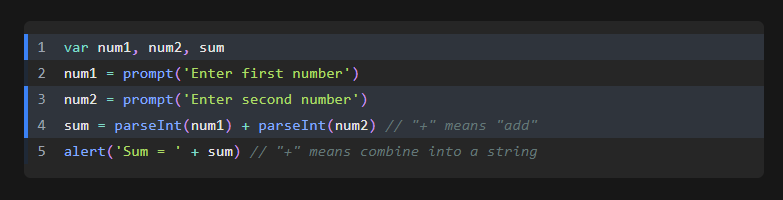
Here's the styled output using the prism-night-owl theme:

For more information on styling of language tokens, consult [refractor] and [Prism].
## API
`rehype().use(rehypePrism, [options])`
Syntax highlights `pre > code`.
Under the hood, it uses [refractor], which is a virtual version of [Prism].
The code language is configured by setting a `language-{name}` class on the `` element.
You can use any [language supported by refractor].
If no `language-{name}` class is found on a `` element, it will be skipped.
### options
#### options.ignoreMissing
Type: `boolean`.
Default: `false`.
By default, if `{name}` does not correspond to a [language supported by refractor] an error will be thrown.
If you would like to silently skip `` elements with invalid languages or support line numbers and line highlighting for code blocks without a specified language, set this option to `true`.
#### options.showLineNumbers
Type: `boolean`.
Default: `false`.
By default, line numbers will only be displayed for code block cells with a meta property that includes 'showLineNumbers'.
If you would like to show line numbers for all code blocks, without specifying the meta property, set this to `true`.
**Note**: This will wrongly assign a language class and the class might appear as `language-{1,3}` or `language-showLineNumbers`, but allow the language highlighting and line number function to work. An possible approach would be to add a placeholder like `unknown` so the `div` will have `class="language-unknown"`
## FAQ
Why does rehype-prism copy the language- class to the <pre> tag?
[Prism recommends](https://prismjs.com/#basic-usage) adding the `language-` class to the `` tag like this:
```html
p { color: red }
```
It bases this recommendation on the HTML5 spec. However, an undocumented behavior of their JavaScript is that, in the process of highlighting the code, they also copy the `language-` class to the `` tag:
```html
p { color: red }
```
This resulted in many [Prism themes](https://github.com/PrismJS/prism-themes) relying on this behavior by using CSS selectors like `pre[class*="language-"]`. So in order for people using rehype-prism to get the most out of these themes, we decided to do the same.
[prism]: http://prismjs.com/
[refractor]: https://github.com/wooorm/refractor
[xdm]: https://github.com/wooorm/xdm
[language supported by refractor]: https://github.com/wooorm/refractor#syntaxes